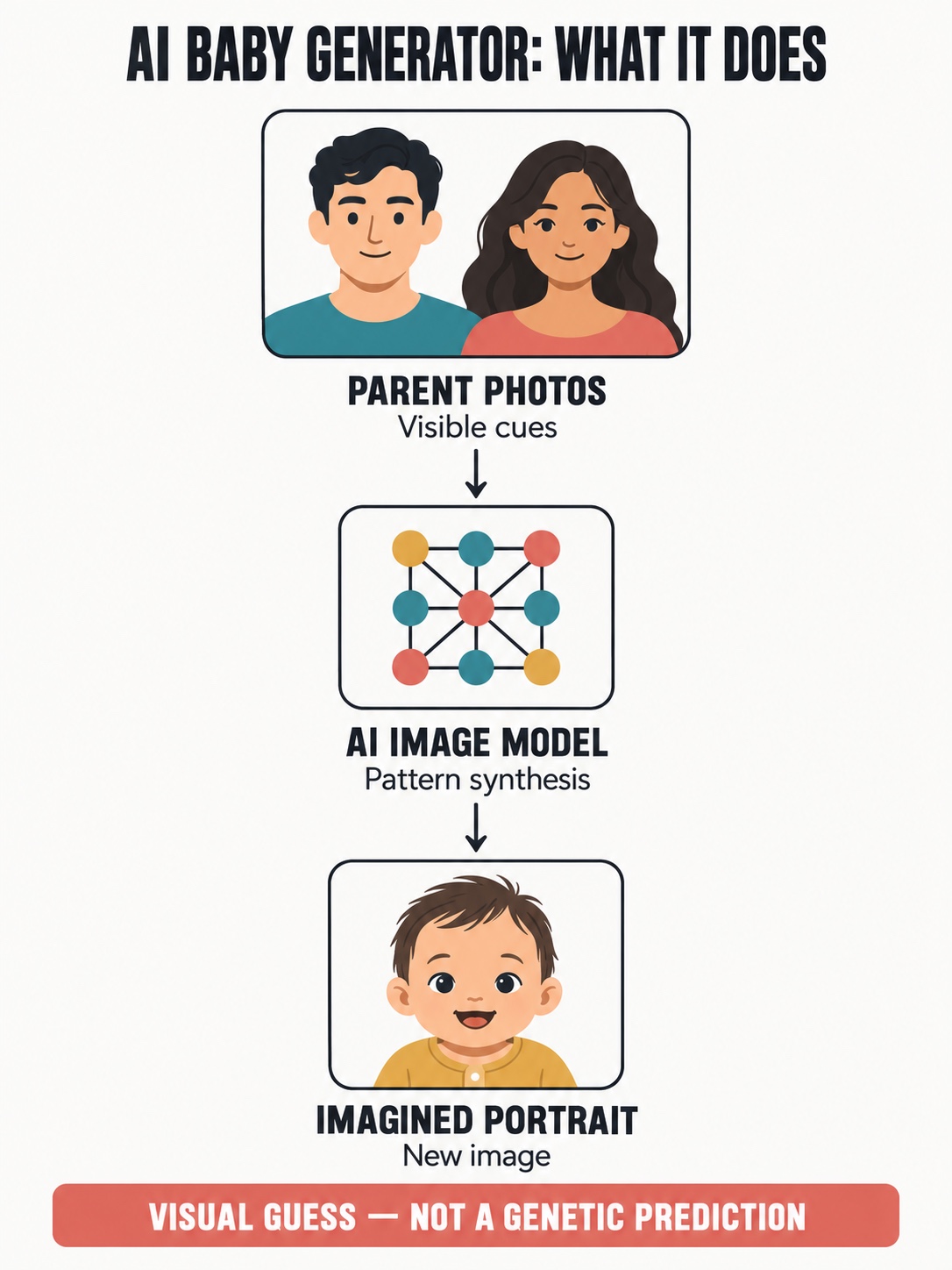
An AI baby generator creates an imagined child portrait from one or two adult photos. It looks for visual patterns in the references and generates a new face that may borrow cues such as face shape, eye area, coloring, or expression. It does not read DNA, model pregnancy, or predict the appearance of a real child.
The result is best treated as a playful image experiment. A convincing portrait can still be biologically meaningless, and a weak result does not say anything about a future family. Before uploading any face, check who owns the service, how long it keeps the files, whether the images may be used for training, and how deletion works.

What does an AI baby generator actually do?
An AI baby generator is closer to reference-based image generation than to a genetic test. The source photos guide the model toward visible features, and the model produces a new portrait in a learned baby or child visual style. It may combine cues from both adults, lean heavily toward one reference, or introduce details that appear in neither photo.
| Common claim | What the tool can realistically do |
|---|---|
| “Predict our future baby” | Create one imagined portrait from visual references |
| “Blend our genetics” | Blend visible image patterns, not DNA |
| “Show inherited traits” | Suggest a visual resemblance without biological evidence |
| “Choose a boy or girl” | Apply a presentation setting chosen by the user |
| “Accurate result” | Produce a plausible-looking image, not a verified forecast |
This distinction matters because realistic rendering can look more certain than it is. The National Human Genome Research Institute defines a polygenic trait as one influenced by multiple genes, often together with environmental factors. A photograph cannot reveal the combination a future child will inherit.
How an AI baby generator works
1. The tool receives the reference photos
Most tools ask for one clear portrait of each adult. Some accept one photo, several angles, or optional settings for age and presentation. The generator is not checking a family tree. It is using the photographs as visual references, much like the inputs described in our image to image AI workflow.
2. Visual cues are mapped into a new portrait
The model responds to visible information such as pose, face proportions, hair, skin tone, light, and expression. It then generates a child portrait rather than cutting and pasting the adults’ faces. Different models and settings can interpret the same references differently, so two services may return unrelated results.
3. Variation is part of the output
Running the same pair twice can produce different faces. One version may emphasize the eyes from the first photo, while another changes face width or coloring. That variation is a property of image generation, not evidence that several outcomes are genetically likely.

Which photos give cleaner results?
The generator can only work with what is visible. Use two portraits that are similar in angle, crop, expression, and lighting. This does not make the prediction more accurate; it simply removes avoidable visual noise and makes the blend easier to judge.
- Choose one adult per photo, facing the camera or turned only slightly.
- Use soft daylight or even indoor light without deep shadows across the face.
- Avoid sunglasses, hats, beauty filters, masks, heavy makeup, and low-resolution crops.
- Use similar expressions. A broad grin in one image and a neutral face in the other can distort the comparison.
- Crop enough background to keep the face clear, but do not crop off the chin, forehead, or ears.
A simple visual diagnostic helps: compare the silhouettes and major face planes before looking at eye color or fine detail. If the two source images use different lens distances or strong side light, the model may be responding to camera distortion rather than family resemblance. The same source-photo discipline also improves photo-to-sketch conversions and AI headshot generators.

How accurate are future baby face results?
They are not accurate in the scientific sense. A realistic face can be well rendered and still have no predictive value. The generator sees pixels, not chromosomes, and it has no information about the combinations of genes, development, age, or environment that shape a real person’s appearance.
Judge the output as an illustration. Ask whether it looks coherent, whether both references influenced the image, and whether obvious artifacts appear around eyes, ears, hair, teeth, or hands. Do not use it to infer health, ancestry, gender, personality, or any medical outcome.
Check photo privacy before you upload
Face photos are personal data, and some systems extract facial features from them. The US Federal Trade Commission warns companies about misleading accuracy claims and unexpected collection or use of biometric information. The UK’s Information Commissioner’s Office also explains that a photograph can become biometric data after specific technical processing enables identification.
| Privacy question | What to look for |
|---|---|
| How long are photos kept? | A specific retention period, not “as needed” |
| Can I delete them? | A clear deletion method covering files and account data |
| Are uploads used for training? | An explicit opt-in or opt-out statement |
| Are files shared? | Named processors and a limited purpose |
| Is the result public? | Private-by-default galleries and sharing controls |
| Can minors use the service? | Age rules and parental-consent terms |
The ICO’s biometric recognition guidance distinguishes ordinary photographs from facial data created for automated identification. You may not know exactly what a consumer generator extracts, which is why the service’s privacy policy and deletion controls matter.
- Ask the other adult before uploading their face.
- Do not upload photographs of children unless the service clearly supports that use and you have authority to consent.
- Avoid workplace, medical, identity-document, or otherwise confidential images.
- Delete the upload and generated files from the account when you are finished.
How to choose an AI baby generator
Start with the privacy policy, not the example gallery. Then compare the number of required photos, generation controls, visible price, watermark rules, resolution, deletion settings, and whether the service works without a broad photo-library permission. A browser tool is not automatically safer than an app; the data terms matter more than the interface.
One commercial example is SuperMaker’s AI baby generator. Treat it as one option rather than a scientific service, and verify its current price, privacy, retention, and account terms yourself. For a wider comparison, see our guides to free AI photo editors and editing photos with AI.


Why these portraits spread so quickly
The output is personal, immediate, and easy to share. It turns a vague “what if?” into a picture that invites comparison and conversation. The emotional reaction comes from recognition: a familiar smile, face shape, or expression appears in a new context. That does not make the image predictive, but it explains why the format travels well in group chats and short-form social feeds.
The same visual mechanism appears in AI outfit generators, portrait tools, and other reference-driven experiences. For responsible publishing, label generated portraits clearly and avoid presenting an imagined child as a real person. Our AI visual storytelling guide covers the wider role of generated imagery in narrative content.
Common problems and what they mean
| Problem | Likely cause | Better next step |
|---|---|---|
| The child resembles only one adult | One reference is clearer or more dominant | Match crop, angle, light, and resolution |
| The face looks distorted | Strong pose, filter, shadow, or low resolution | Use neutral front-facing portraits |
| Every result is different | Normal generative variation | Keep the same inputs and settings for comparison |
| The portrait looks too polished | The model applies a studio-baby visual style | Treat it as an illustration, not evidence |
| The service asks for broad gallery access | Convenience permission exceeds the immediate task | Upload selected files or choose another service |
If you want more control over a reference-driven result, use the structured preserve/change/avoid method described earlier. For art and lesson assets rather than personal portraits, the AI image generator workflow for artists is the better next step.
The practical takeaway
Use an AI baby generator as entertainment, not as a forecast. Choose clear photos, get consent from every person shown, review retention and training terms, and label the finished portrait as AI-generated when sharing it. The image may be charming or surprisingly familiar. It is still one model’s visual guess.
AI baby generator FAQ
What is an AI baby generator?
An AI baby generator is an image tool that uses one or two adult portraits as visual references and produces an imagined child portrait. It can borrow visible cues such as face shape, eye area, coloring, or expression, but it does not read DNA or calculate how a real child will look.
Are AI baby generator results accurate?
No result should be treated as an accurate genetic prediction. The image is a plausible visual blend shaped by the model, the source photos, and random generation. A real child can inherit many combinations of traits that are not visible or predictable from two photographs.
What photos work best in an AI baby generator?
Use clear, front-facing portraits with one person in each image, even daylight, a neutral expression, and no sunglasses, hats, heavy filters, or strong shadows. Similar camera angles and image quality make it easier to compare the visible features in both source photos.
Is it safe to upload parent photos?
Safety depends on the service. Read its privacy policy before uploading and check retention time, deletion options, model-training terms, account requirements, and whether images may be shared with third parties. Upload another person's photo only with their permission.
Can an AI baby generator predict gender or inherited traits?
It may let you choose a boy or girl presentation, hair color, or age, but those are creative settings rather than biological predictions. The tool generates a visual scenario; it cannot determine chromosomes, health, personality, or the real inheritance of facial traits.
Why does the generated baby look different each time?
Image generation includes variation, so the model can emphasize different visible cues on each run. Changes in crop, lighting, expression, or reference order can also shift the result. Use the same source photos and settings when you want a fair comparison between outputs.
- 12shares
- Facebook0
- Pinterest9
- Twitter3
- Reddit0