

Large design projects rarely fail in one dramatic moment. They drift. Boards fill with options and meetings run to schedule, yet the important questions stay open far longer than anyone admits: which layout, which material, which content model, and who signs off.
That gap between visible activity and settled decisions is where budgets leak and deadlines slip. This guide sets out a practical system covering scope, decision rights, dependencies, review cycles, version control, resources, risk and handoff for creative, architectural and multidisciplinary work.

What is design project management?
Design project management is the coordination of the creative and technical work needed to deliver an approved design within agreed scope, time and budget. It covers planning, resourcing, reviews, approvals, risk and handoff, while deliberately leaving room for the exploration and iteration that good design requires.
It is not the same as creative direction. A creative director or design lead decides what good looks like: the concept, the quality bar, and the aesthetic and functional judgements. The project manager makes sure those judgements happen at the right time, with the right people and the right information.
On a large project, the two roles depend on each other. Without direction, a well-run project delivers a competent but forgettable result. Without management, strong ideas stall in unresolved feedback, late inputs and unclear sign-off, and the team spends its budget reworking decisions it never formally made.
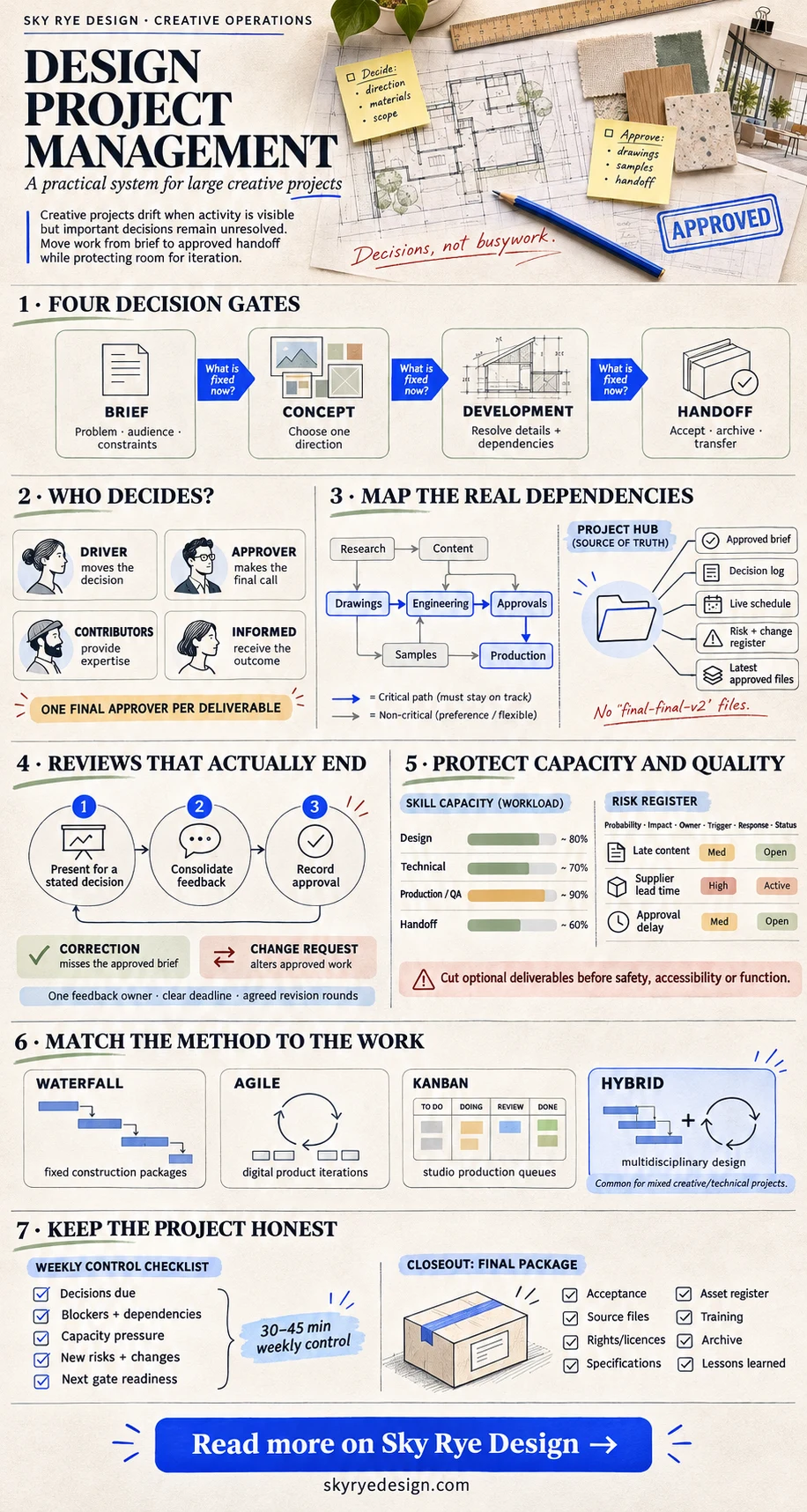
Most projects move through four broad phases. The labels vary by discipline, but each phase should end with a decision rather than a pile of deliverables.
| Phase | Main decision | Owner | Exit criteria |
|---|---|---|---|
| Brief | What problem, for whom, within which constraints? | Client sponsor with project lead | Signed-off brief, budget range, exclusions, success criteria |
| Concept | Which direction goes forward? | Final approver, advised by design lead | One approved direction; other options archived |
| Development | How does the direction work in detail? | Design lead with technical consultants | Coordinated design, resolved dependencies, approved specification |
| Production/handoff | Is it ready to build, launch or print? | Final approver | Accepted deliverables, final files, handoff complete |
Define scope with decision gates, not a giant task list
A long task list describes activity, not scope. Large projects need a short brief that defines the problem and its limits, followed by gates where specific decisions become fixed. A useful creative brief covers:
- Problem: what needs to change, and why now
- Audience or user: who the work serves and what they need
- Deliverables: what will be produced, in which formats
- Constraints: budget, programme, site, brand, regulation, technology
- Exclusions: what is explicitly out of scope
- Success criteria: how the result will be judged
- Assumptions: what the team is taking as true until proven otherwise
Managing creative work requires clear scope and client expectations. A gate is a formal checkpoint where the approver confirms a set of decisions. A strong gate answers one question clearly: what is fixed now, and what is still allowed to change? An interior scheme might fix the layout and palette at concept while joinery details and lighting remain open.
Gates also guard against premature polish. A detailed render or pixel-perfect mock-up can win approval while circulation, content hierarchy or functional logic are still unresolved. Reviewers respond to the finish, miss the structural question, and it resurfaces expensively in development.
Match fidelity to the decision being made. Use diagrams, wireframes, massing models or grey-box layouts while structure is open, and save polish for when structure is fixed.
Gate checklist
- Decisions confirmed at this gate are listed in writing
- Open items are named, with deadlines
- The named approver has signed off
- Risks and assumptions are updated
- Rejected options are archived, not deleted
- The next gate’s date and criteria are agreed
Map roles and approval rights
Many projects stall not because people disagree, but because nobody knows whose agreement counts. A lightweight model of Driver, Approver, Contributors and Informed is easy to explain to clients and consultants, and it removes most of that ambiguity.
| Role | Responsibility | Example on a workplace fit-out |
|---|---|---|
| Driver | Moves the decision forward, gathers input, sets deadlines | Project manager or design lead |
| Approver | Makes the final call | Client project sponsor |
| Contributors | Provide expertise and recommendations | Engineers, cost consultant, accessibility specialist |
| Informed | Told the outcome | Facilities team, wider leadership |
The critical rule is one final approver per deliverable. A decision needing five signatures is usually negotiated rather than made. If authority must be shared, agree in advance how disagreements are resolved and who breaks a tie.
Subject experts advise rather than vote. An engineer may rule a proposal out on technical or regulatory grounds, which is different from a preference about colour. Record those constraints, then let the approver decide within them.
Plan around dependencies and design uncertainty
Design schedules break when one piece of work waits on another that nobody tracked. Map dependencies early across every workstream that feeds the design; for built work, this construction project planning guide shows how software can connect schedules, drawings and design intent, and keep the map visible to the whole team. Typical inputs include:
- user research before information architecture is fixed
- final content before layouts are signed off
- survey drawings before space planning
- material samples before finishes are approved
- engineering input before structural or services decisions
- supplier lead times before specification is frozen
- statutory or client approvals before production
- fabrication, print or build slots before final files are due
A hard dependency means work genuinely cannot proceed without the input: you cannot specify a fabric the supplier cannot deliver. A preference means someone would like to see something first, but the work could reasonably continue. Schedule hard dependencies with dates and owners; challenge preferences that start blocking progress.
The critical path is the chain of dependent tasks that sets the earliest possible finish. A slip anywhere on it moves the end date. Knowing it shows where time must be protected and where a delay will be absorbed without harm.
Design is rarely linear, though. Concepts loop back and testing reopens settled questions. Place buffers before gates and fixed external dates, rather than spreading thin margins across every task, where they tend to disappear unnoticed.
Create one source of truth
When the brief sits in an email, the schedule in a spreadsheet and the latest drawings in someone’s downloads folder, the team spends time reconciling versions instead of designing. Agree one project hub. The same principle anchors creative operations for remote design teams and studio workflow management, and agree that anything not stored there is not current. At minimum it should hold:
- the current approved brief
- a decision log: what was decided, when, by whom, and what it replaced
- the live schedule, with gates and dependencies
- the risk and change register
- the latest approved files, separated from work in progress
The decision log is the most underused of these. One line per decision is enough. When someone later asks why the entrance moved, the answer takes seconds to find rather than an afternoon of searching email.
Agree file naming before the first files are shared. There is no single standard across disciplines, so pick a pattern and apply it consistently. One workable structure is Project_Workstream_Asset_Stage_V03_YYYY-MM-DD, which shows sequence, maturity and recency. Avoid “final” or “latest”, which stop being true almost immediately.
Run reviews without endless revision loops
Endless revisions usually come from reviews with no defined purpose. Before each review, state what is being reviewed, who needs to attend, when feedback is due and what level of agreement counts as approval. Without those four points, comments multiply and decisions do not.
Feedback should be consolidated before it reaches the designers. One owner gathers comments, resolves contradictions and sends a single prioritised list. Designers should never have to choose between two senior stakeholders’ conflicting notes.
Agree a revision budget in the brief or contract, either as a set number of rounds per stage or as a time allowance. This makes the cost of extra rounds visible and encourages complete feedback first time.
Separate corrections from change requests. A correction fixes something that misses the approved brief, such as a wrong dimension or an off-brand colour. A change request alters something already approved. Corrections are the studio’s responsibility; change requests go through change control.
A practical review agenda
- the decision this review must reach
- what was fixed at the last gate, and what remains open
- the work presented, with rationale
- clarifying questions only
- the feedback deadline and consolidation owner
- the decision recorded, or a date set for it
Balance capacity, budget and quality
Headcount says little about deliverability. Five designers are not interchangeable if only one can produce construction details or motion work. Plan capacity by role and skill, and identify whose time is scarce, because those people usually become the bottleneck.
Include the work that is easy to forget. External consultants have their own schedules and review periods. Production, quality assurance, accessibility testing, proofing and handoff preparation all take real time, and when they are missing from the plan they get squeezed into the final week.
Hold contingency as a deliberate, visible allowance rather than padding hidden inside tasks. Its size depends on risk, contract type and how much remains unknown, so agree it with the client and record the conditions for drawing it down.
When constraints tighten, cut optional deliverables, extra options and presentation fidelity first. Do not cut core safety, accessibility or functional requirements. They are part of what makes the design acceptable, and removing them creates rework or a result the client cannot use.
Keep a live risk and change register
The PMI lexicon describes project governance as the framework, functions and processes guiding project management. A risk register is only useful if the team reads it. Keep it short, review it weekly, and give every entry an owner, a trigger that signals the risk is becoming real, and an agreed response.
| Risk | Probability | Impact | Owner | Trigger | Response | Status |
|---|---|---|---|---|---|---|
| No user research before UX decisions | Medium | High | UX lead | Research unbooked by gate 1 | Run rapid interviews; log assumptions | Open |
| Late client content | High | High | Client lead | Copy missed agreed date | Design to real-length drafts; review launch date | Monitoring |
| Long supplier lead time | Medium | High | Interior designer | Quote shows extended delivery | Approve alternative; order long-lead items early | Open |
| Permit or planning review delay | Medium | High | Architect | Consultation comments received | Prepare revisions in parallel | Open |
| Inaccessible component | Medium | High | Design system lead | Fails contrast or keyboard test | Fix before release | Open |
| Brand or legal approval stalls | Medium | Medium | Brand manager | No reply within review window | Escalate to approver; involve legal earlier | Open |
Change is normal on design projects; unmanaged change is the problem. Log every change to approved scope with what changed, why, its impact on time, cost and quality, and who approved it. Without that record, scope expands quietly until the budget runs out.
Choose a workflow that matches the work
Project phases give each part of the work a distinct purpose, but no single method suits every project. The right choice depends on how fixed the requirements are, how often feedback can be gathered and whether outputs can be released in increments.
| Method | How it works | Fits well | Watch for |
|---|---|---|---|
| Waterfall | Sequential phases, each completed before the next | Fixed construction packages, print production | Late discoveries are costly |
| Agile | Short iterations with frequent reprioritisation | Digital product iterations, design systems | Scope can grow without firm gates |
| Kanban | Continuous flow with limits on work in progress | Studio production queues, campaign assets | Less suited to large one-off decisions |
| Hybrid | Fixed gates with iterative work inside phases | Multidisciplinary projects | Needs clear rules on what is fixed |
On multidisciplinary work, an architectural package might follow staged sign-off while the wayfinding and digital signage evolve in sprints. Agree where the iterative work must meet the fixed gates, so the two rhythms do not collide.
Use a weekly project control rhythm
Large projects need a regular moment where the core team looks at the whole picture. As a practical example, a 30–45 minute weekly meeting with the driver, design lead and workstream leads often works, provided it follows a fixed agenda:
- decisions due this week and next
- blockers and dependencies
- capacity pressures
- new risks and pending changes
- readiness for the next gate
Status reports should expose the decisions needed, not just list completed tasks. “Twenty screens designed” hides the fact that the navigation is still unapproved. Lead with what is blocked and what the approver must decide.
Close the project properly
Handoff is often rushed because the team is already moving on. Poor closure leads to lost source files, support requests and disputes over rights, so treat close-out as a phase with its own owner and checklist:
- formal acceptance against the brief
- final files, plus editable source files where contracted
- rights and licences for fonts, images and software
- specifications, style guides and system documentation
- an asset register of every deliverable and its location
- training or walkthroughs for those maintaining the work
- an archive of the hub and decision log
- a lessons-learned review, with technical approvals tracked through a submittal register where relevant
For architecture and interiors, record or as-built information may form part of close-out where the contract requires it. Obligations differ by jurisdiction and appointment, so confirm local professional and legal requirements rather than relying on a generic list.
Common mistakes that make large design projects drift
- Polishing before structure is agreed. Match fidelity to the decision being made.
- Too many approvers. Name one final approver per deliverable.
- Scattered feedback. Appoint a consolidation owner and set a deadline.
- Treating changes as corrections. Route changes to approved work through change control.
- Untracked external inputs. Put consultant, supplier and approval dates on the schedule.
- Task-only status reports. Lead with blocked decisions.
- Last-minute handoff. Plan close-out as its own phase.
A practical starting point
You do not need a full overhaul to improve a project already under way. Start with a few documents and one well-run meeting, then add structure only where the project needs it:
- Write a one-page brief.
- Name the final approver for each major deliverable.
- Define the first gate: what will be fixed, what stays open, and by when.
- Start a decision log and risk register in a shared hub.
- Schedule the first structured review with a clear purpose and feedback deadline.
If your team is evaluating project management software, map the workflow first: phases, gates, roles, reviews and file handling. A tool chosen before the process is understood tends to reshape the work around its features rather than support the decisions the team needs to make.
Related design project management guides
- Creative project management for remote design teams
- Creative operations for distributed studios
- Creative workflow management for design studios
- Construction project planning software and design intent
- Submittal registers for interior design projects
- How to choose project management software
- Browse the Sky Rye Design archive
- 1share
- Facebook0
- Pinterest1
- Twitter0
- Reddit0