Last spring I was briefed on a product launch that needed six video assets — three horizontal for broadcast, three vertical for social — across two markets, two languages, with brand-consistent lighting and a specific camera language the creative director had used across the whole campaign. Six weeks, mid-size budget, no video production team in-house.
Two years ago I would have outsourced it and spent most of the budget on a single production day. Last year I would have tried a hybrid approach — AI for some rough cuts, a one-day shoot for the hero assets — and ended up with inconsistent quality across the deliverables. This year I generated the entire suite in Director Mode, reviewed and refined over three sessions, and delivered everything in the correct aspect ratios with synchronized audio that the creative director described as ‘not obviously AI.’
- The Problem AI Video Had Until Now
- Why Synchronized Audio Changes Everything
- Director Mode: Why This Is the Designer's Tool
- Multi-Input: Reference the Way You Actually Work
- How the Current AI Video Landscape Looks
- The Professional Workflow in Practice
- What This Means for Designers Right Now
- FAQ: AI Video for Designers in 2026
That shift — from ‘useful experiment’ to ‘actual production tool‘ — didn’t happen because the images got prettier. It happened because the tools finally gave designers control. Not prompt-guessing control.
Cinematographer control. The kind where you specify a camera path, a lighting setup, a shot transition, and the output actually executes your brief rather than interpreting it. That’s the story of AI video in 2026, and it’s worth understanding in detail — because the gap between designers who get this now and those who discover it in eighteen months is going to be significant.
The Problem AI Video Had Until Now
The frustration with AI video tools through 2024 and into 2025 was never really about quality. Even early generative video produced frames that were visually impressive. The problem was unpredictability — the gap between what you described and what the tool produced was wide enough that using AI video in a professional context felt like gambling with client work.
Two specific failures made this a professional dealbreaker. The first: camera language was uncontrollable. You could describe a ‘slow dolly toward the subject’ and get a cut, a pan, or something that felt like motion sickness. In a campaign with a defined visual language, random camera behaviour isn’t a quirk — it’s a rejection.
The second: audio was an afterthought. Silent video with layered audio tracks feels synthetic in a way that’s immediately perceptible, even when the individual elements are high quality. The desynchronization between sound and image — even slight, even subperceptual — reads as ‘AI content’ to a viewer who hasn’t been told to look for it.
Both of these problems have been solved in 2026 in ways that genuinely change the professional calculus. Understanding how they were solved is worth the time — because it explains not just what the tools can do now, but what they’ll be able to do in twelve months.
✏ Designer note: If you’ve dismissed AI video tools based on experiences from 2024 or early 2025, the current generation is a different category of product. The workflow is different, the control is different, and the professional ceiling is significantly higher. The investment in learning it now pays off faster than any other tool skill a designer can acquire in 2026.
Why Synchronized Audio Changes Everything
The Architecture Behind the Feeling
The specific technical shift that makes 2026 AI video feel different is the Dual-Branch Diffusion Transformer architecture — a generation approach where audio and video are produced simultaneously in the same process rather than as sequential outputs. Most people gloss over technical architecture details, but this one is worth understanding because its effect is perceptible in the output even to viewers who know nothing about how it works.
In previous AI video systems, the workflow was: generate visual sequence → analyse motion → infer appropriate audio → layer and time-shift until approximately synchronized. The result was audio that felt placed rather than present — Foley effects that arrived slightly after impact, ambient sound that didn’t quite match the implied acoustics of the space, environmental noise that felt generic rather than specific to the scene.
The Dual-Branch approach runs visual and audio generation in parallel, with the two branches continuously informing each other throughout the diffusion process. Sound is not inferred from completed visuals — it is generated alongside them, physically synchronized at the model level. A footstep sound is not timed to match a foot hitting the ground; it is generated as part of the same process that generates the foot hitting the ground. The perceptual result is the difference between a dubbed film and one shot with production audio. The latter simply feels real in a way the former never fully achieves, regardless of dubbing quality.
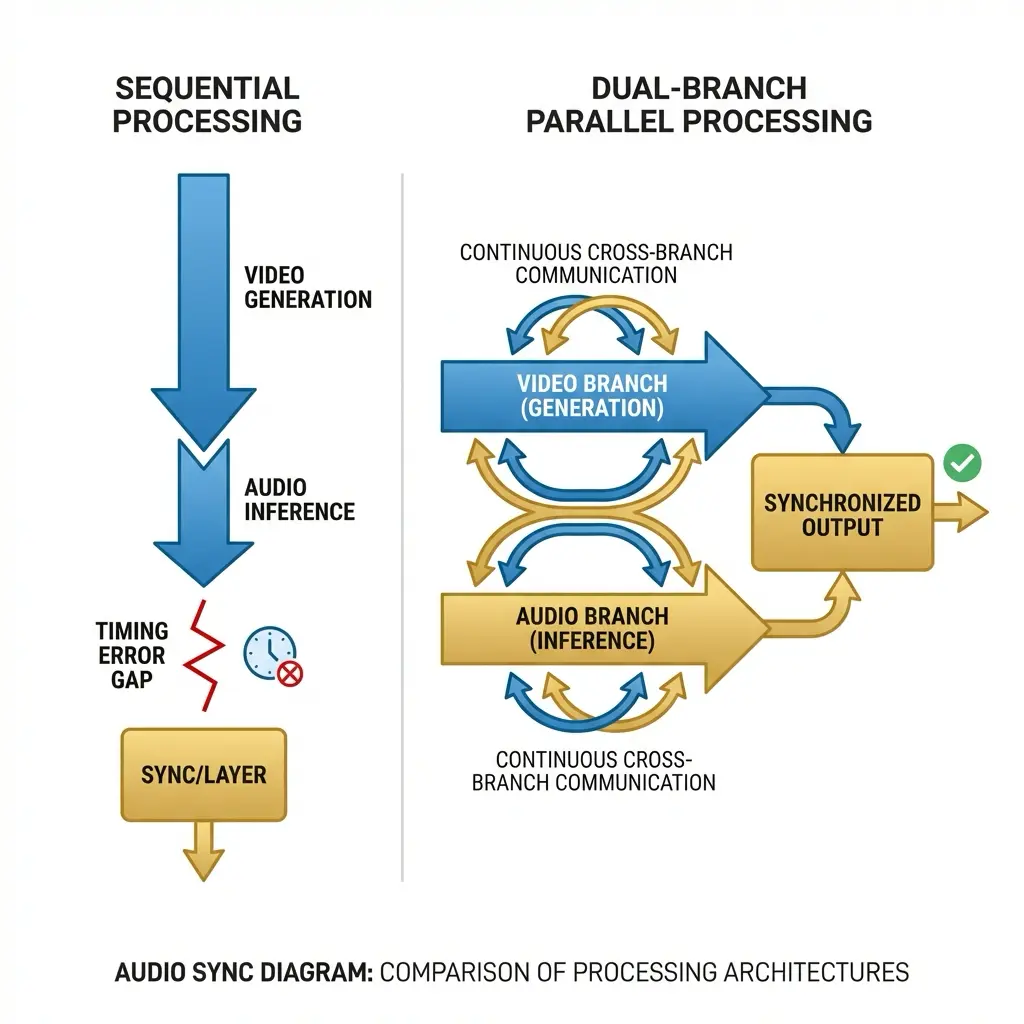
This is what makes Seedance 2.0’s audio integration a genuine differentiator rather than a feature bullet point. When you watch output generated with native synchronized audio alongside output from tools that layer audio in post-processing, the difference is immediately apparent — and it’s the difference between content that reads as professional and content that reads as AI-generated.
Director Mode: Why This Is the Designer’s Tool
The naming is intentional and accurate. Director Mode is not a simplified interface for consumers — it is a parameter-level control system that maps onto how cinematographers and creative directors think about visual language. Which means it maps directly onto how designers think.
Camera Language as a Design Decision
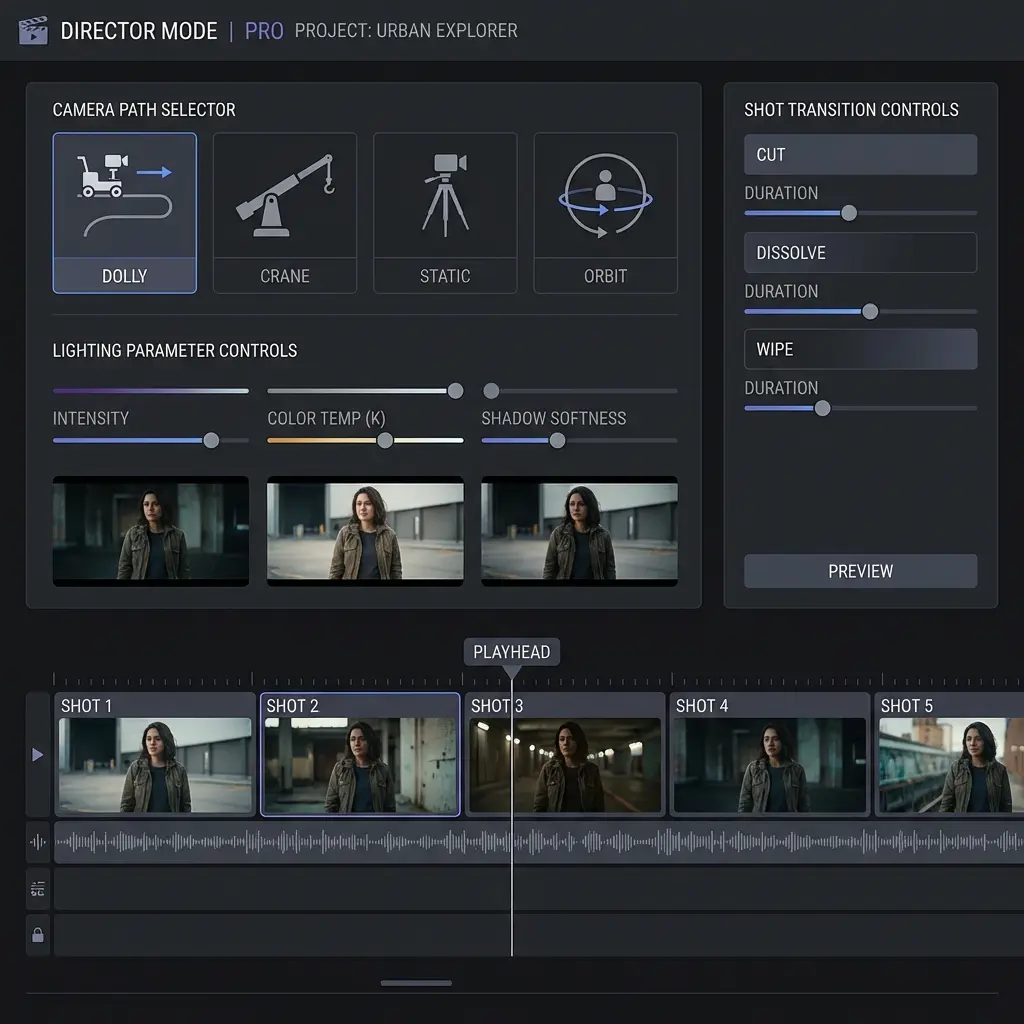
In Director Mode, camera behaviour is specified rather than prompted. You set a camera path — dolly, crane, orbit, static — as a parameter. You set the angle — eye level, low angle, bird’s eye, 45-degree three-quarter. You set movement speed and transition type between shots. These are the same decisions a designer makes when specifying motion in a brand guidelines document or directing an animatic. The AI executes the specification rather than interpreting a description.
This distinction — specification versus description — is the entire professional value of Director Mode. Description-based prompting produces outputs that you then select from. Specification-based control produces outputs that you directed. The creative responsibility (and creative credit) sits in a completely different place.
Lighting as a Parameter
Lighting conditions are specifiable in Director Mode with the same directness as camera angles. Hard directional light, soft diffused light, golden hour, overcast neutral, high-key studio, low-key dramatic — these are selectable parameters rather than terms in a prompt that the model may or may not weigh appropriately. For brand work where lighting consistency across assets is a visual identity requirement, this is the difference between a tool that is professionally usable and one that isn’t.
Multi-Shot Narrative Coherence
Perhaps the most significant capability for working designers: the ability to generate multi-shot sequences from a single brief while maintaining character and environment consistency across cuts. Previous AI video tools produced isolated clips — usable as standalone assets but requiring significant manual work to stitch into a coherent sequence. Director Mode generates a series of shots that follow a specified narrative arc with consistent characters, consistent environments, and consistent lighting — the three variables that make or break visual continuity in professional video work.
✏ Designer note: For designers moving from static to motion deliverables: think of Director Mode as a motion brief rather than a prompt. Describe the shot list, the camera language, the lighting setup, and the transitions — exactly as you would brief a video director or animatic artist. The tool responds to directorial intent much better than to descriptive language.
Multi-Input: Reference the Way You Actually Work
The input architecture reflects how professional creative briefs actually work — not as single text descriptions but as collections of references, each communicating a different dimension of the intended output.
Director Mode accepts text, image, video, and audio inputs simultaneously. A creative director can upload a lighting reference image from a previous campaign, a video clip establishing the motion language and pacing, and a text brief for the specific scene narrative. The model synthesises these into a coherent output that honours all three reference dimensions — the lighting quality of the image, the motion character of the video, the narrative content of the text.
In practice this dramatically reduces the iteration cycle. Instead of generating a first output, noting what’s wrong with the lighting, generating a second output with a lighting-focused prompt adjustment, noting what’s now wrong with the motion, and continuing for six or eight cycles — you upload your references and the first output is usually 70-80% of the way to the brief. The remaining iteration is refinement rather than fundamental correction.
The VFX export capabilities complete the professional workflow loop: depth maps and alpha masks exportable directly from the generation process, compatible with After Effects and Nuke compositing workflows. AI-generated elements can be layered into live-action footage at the compositing stage rather than requiring the entire visual to be AI-generated. This hybrid approach — AI for specific elements, live-action for others — is where most professional productions using AI video in 2026 actually land.
How the Current AI Video Landscape Looks
It’s worth being direct about where different tools sit, because the landscape has stratified significantly in 2026. Three platforms define the current professional tier:
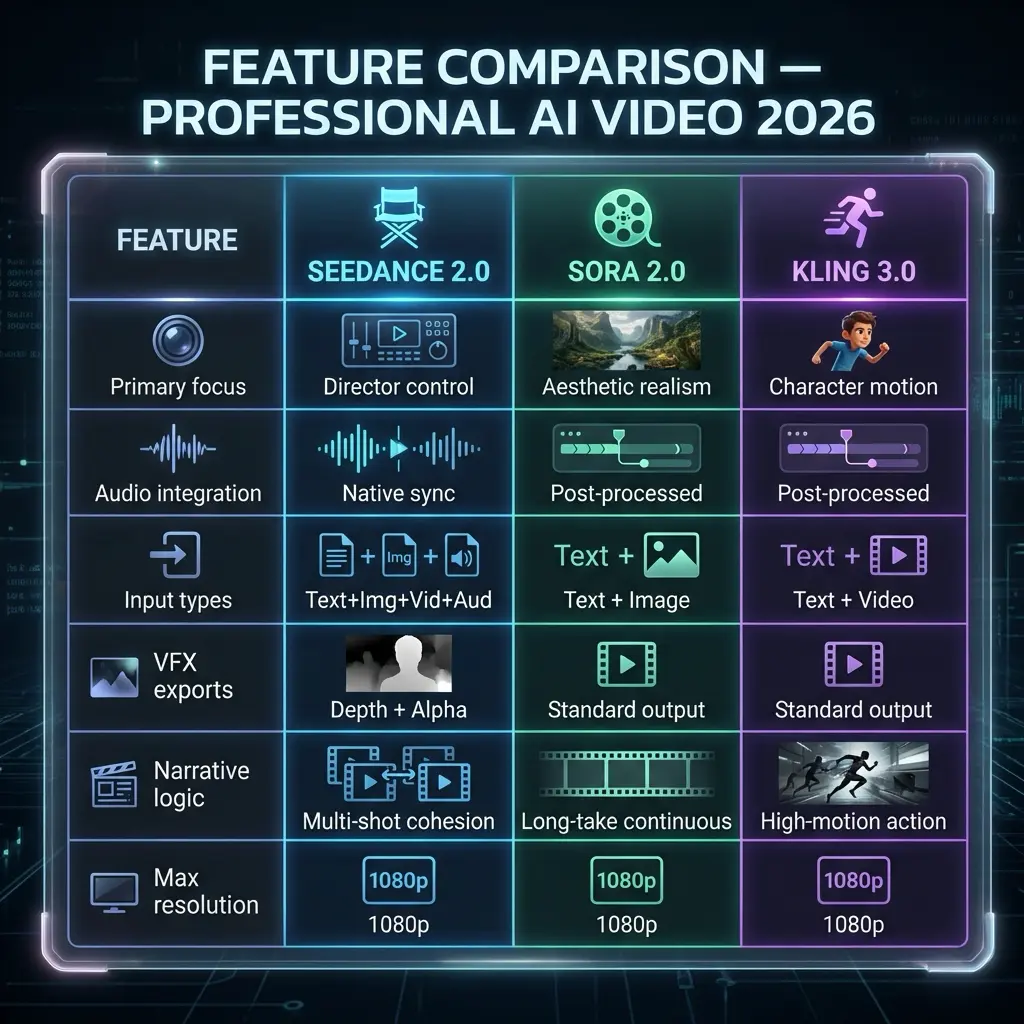
The differentiation is clear: Sora prioritises aesthetic realism and is the better choice for visually ambitious single-clip work where the goal is photographic quality. Kling’s strength is high-motion character interaction — action sequences, sports, physical performance. Seedance 2.0’s defining value is precision and control — the choice for professional briefs where specific outcomes are required rather than impressive-looking ones.
The honest limitation worth acknowledging: complex physics simulation remains a challenge across all three platforms. Liquid dynamics, multi-object collisions, cloth physics — all of these can produce visual anomalies in the current generation of tools. The professional workflow accounts for this by designing scenes that work within the physics the models handle reliably, and reserving complex physical interaction for hybrid live-action approaches.
The Professional Workflow in Practice
Based on actual production use rather than official documentation, the workflow that produces the most reliable professional output has three stages:
- Reference assembly before generation. Collect your lighting reference, motion language reference, and any audio reference before opening the tool. The quality of your multi-input references determines the quality of the first-pass output more than any other single factor. Think of this as the pre-production phase — the equivalent of the mood board and shot list that precede any professional production.
- Director Mode specification, not description. Translate your references into Director Mode parameters rather than prompt language. Camera path, lighting setup, shot transitions, and character consistency parameters should all be specified before initiating generation. Resist the instinct to describe in text what you can specify in parameters — every parameter you specify is a variable that the model doesn’t have to guess at.
- Generate, review, export for post. First-pass output with well-assembled references and clear Director Mode parameters should be 70-80% brief-accurate. Review specifically for physics anomalies and lighting consistency issues. For complex compositions, export depth maps and alpha masks for compositing rather than treating the generated video as a final deliverable — the hybrid approach consistently produces better results than expecting AI-only output to carry the full visual weight.
✏ Designer note: The most significant productivity gain from AI video in 2026 is not in the generation itself — it’s in the elimination of the pre-production communication overhead. A designer who can generate a precise pre-visualization in Director Mode and share it with a client or creative director before any live production begins saves more time in feedback cycles and scope changes than the generation itself costs. Treat AI video as a communication tool first and a production tool second.
What This Means for Designers Right Now
The transition from static to motion deliverables is not coming — it’s here. Brand identities now include motion guidelines as standard. Product launches require video assets across multiple aspect ratios and platforms simultaneously. Editorial content is video-first in ways it wasn’t three years ago. The design brief has expanded.
The designers who will be best positioned in eighteen months are not the ones who produce the most technically impressive AI video. They’re the ones who’ve internalised the directorial language — camera paths, lighting setups, shot transitions, narrative coherence across cuts — and can brief AI tools with the same specificity they bring to any other design problem. The tool rewards design thinking. Composition, light, sequence, rhythm — these are design skills, not video production skills.
The year AI video became professional is the year the tools started speaking the same language as the people who needed to use them. Seedance 2.0 is the clearest current example of that translation — a tool built for directors rather than users. For designers, that distinction is the whole point. Start using it before your clients ask why you’re not.
FAQ: AI Video for Designers in 2026
Q: What is Director Mode in AI video?
Director Mode is a professional control layer that lets you specify camera angles, movement paths, lighting conditions, and shot transitions at the parameter level. Instead of describing what you want and hoping the AI interprets it correctly, Director Mode gives you the same intentional control as a traditional cinematographer — specifying a dolly-in, a 45-degree side angle, or a specific lighting setup as direct parameters rather than as descriptive language.
Q: What is a Dual-Branch Diffusion Transformer?
An AI architecture that generates audio and video simultaneously in the same process rather than creating silent video and layering audio afterward. The two branches — visual and audio — run in parallel and are synchronized at the generation level. The result is ambient noise and Foley effects that feel genuinely connected to the visual rather than overlaid — the perceptual difference between dubbed audio and production audio.
Q: How does AI video compare to traditional production in 2026?
For pre-visualization, advertising prototypes, and content at scale, professional AI video tools now produce 1080p output with director-specified camera control, synchronized audio, multi-shot narrative coherence, and VFX-ready depth map exports. The remaining gap is in complex physics simulation and the specific creative judgment that experienced directors bring to high-stakes work. The honest answer: AI video is a genuine production tool for most commercial work and a genuine pre-production tool for all of it.
Q: Should designers learn AI video tools in 2026?
Yes. The shift from static to motion deliverables is accelerating across every design discipline. Designers who understand how to brief and direct AI video tools have a significant production advantage: the ability to produce motion content without a full video production team. Director Mode tools specifically reward design thinking — composition, lighting, camera language — rather than technical video production skills. The learning curve is shorter for designers than for almost any other professional category.
- 14shares
- Facebook0
- Pinterest14
- Twitter0
- Reddit0