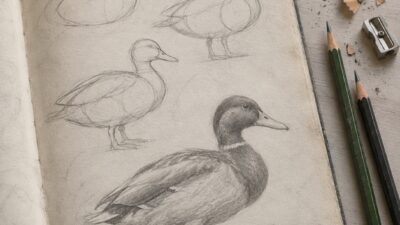
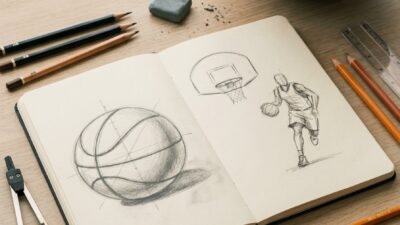
Learning how to draw easy digital art is mostly about keeping the first drawing small. Do not start with a full character, background, lighting setup, and ten brushes. Start with one eye, one flower, one snack, one hand pose, or one little object you can finish before you get tired of the file.
The digital part gives you layers, undo, opacity, and clean color fills. The drawing part still needs the old habits: simple shapes, checked proportions, controlled line weight, and a clear light side and shadow side.
I like beginner digital sketches that have a finish line. Rough sketch, clean line, flat color, one shadow pass, one highlight pass. That is enough to learn the tool without drowning in options.
Key takeaways
- Start with easy digital art subjects that can be finished in one short session.
- Use a small layer stack: rough sketch, clean line, flat color, shadow, highlight, and notes.
- Zoom out often. A drawing that reads well small will usually survive details better.
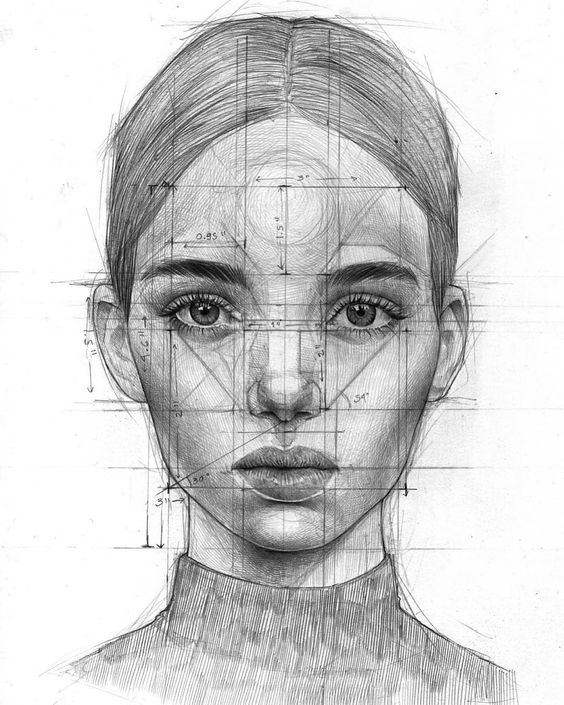
- Treat the images below as practice prompts, not perfect portfolio pieces.
How to draw easy digital art step by step
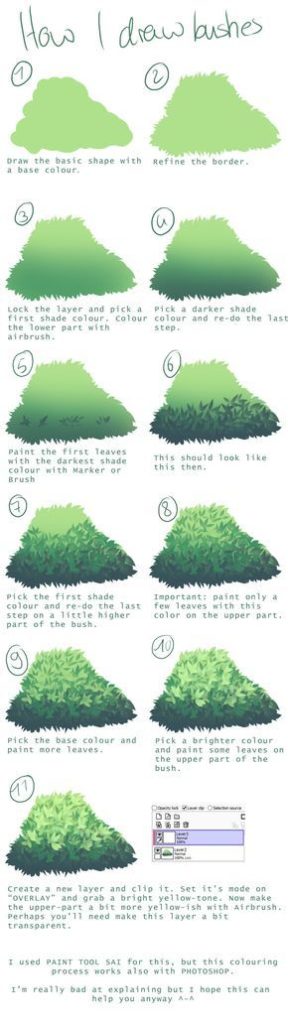
To draw easy digital art, choose one simple subject and build it in layers. Make a loose sketch with big shapes first, lower the sketch opacity, then draw a cleaner line layer on top. Add flat colors before shadows. Use one soft shadow layer and one small highlight layer instead of painting everything at once. Keep the canvas modest, name your important layers, and stop when the idea reads clearly. The goal of a beginner digital drawing is not to use every brush. It is to finish a small drawing and understand what each step changed.
| Step | Layer or tool | Beginner check |
|---|---|---|
| 1. Pick a small subject | Reference or blank canvas | Can you finish it in 15 to 45 minutes? |
| 2. Block the shape | Rough sketch layer | Is the silhouette clear when zoomed out? |
| 3. Clean the line | Line layer | Are the main edges calmer than the sketch? |
| 4. Add flat color | Color layer under the line | Can each color area be selected or adjusted easily? |
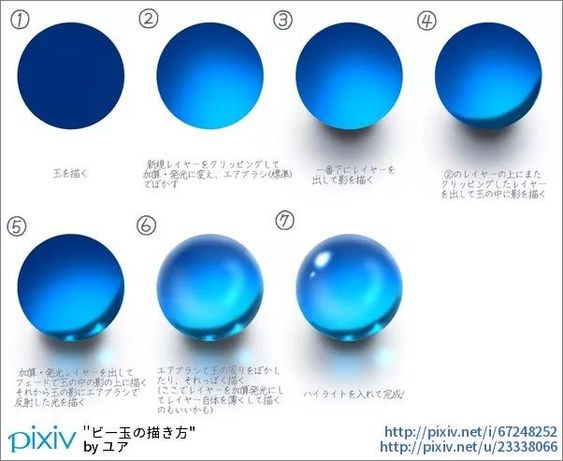
| 5. Add light and shadow | Multiply or clipped shadow layer | Does the form read before texture? |
| 6. Do one cleanup pass | Top correction layer | Are the messy edges fixed without overworking the drawing? |
Easy digital art subjects to start with
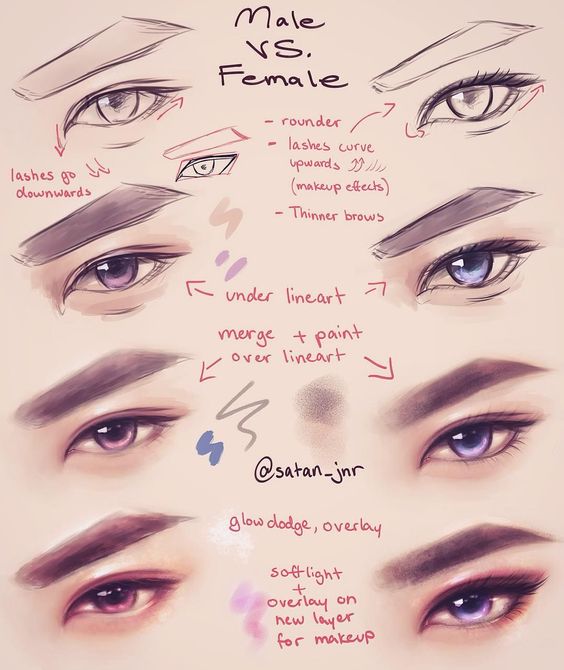
The best first subjects are small enough to repeat. Eyes, lips, noses, fruit, cups, leaves, shoes, simple clothes, and food sketches all work because they teach line, shape, and value without asking for a whole scene. If you want a bigger idea list later, the Sky Rye guide to digital art ideas and tips is a useful next stop after this tutorial.

Eyes are popular for a reason: they let you practice symmetry, soft shading, crisp highlights, and curved lashes on a tiny canvas. Keep the iris simple first. A clean oval, a dark pupil, one reflected light shape, and a soft upper lid shadow can already feel finished.
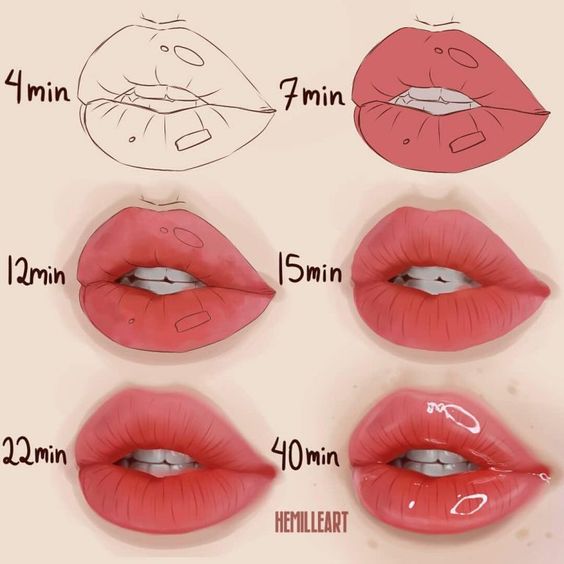

Face features before full portraits
A full portrait can overwhelm a beginner because every proportion depends on the next one. Practice one feature at a time, then place two or three features together on a small study page. For extra traditional-to-digital context, use the guide on drawing in digital format when you want a slower bridge from paper habits to layers and brushes.

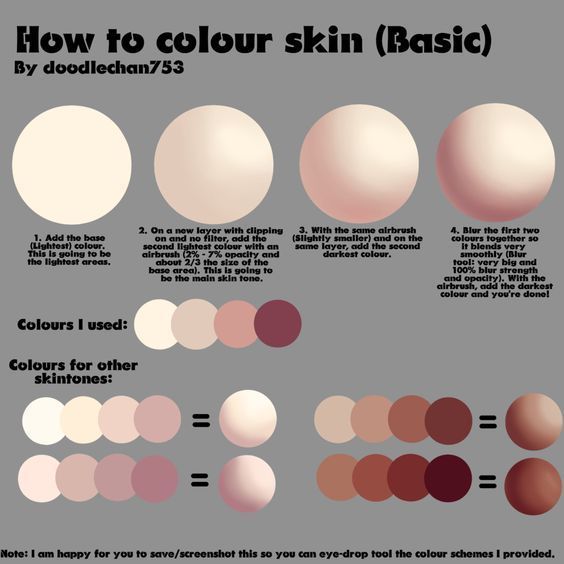
Set up the canvas and layers
Use a canvas that does not make the brush lag. For beginner practice, a square or vertical canvas around 2000 to 3000 pixels on the long side is usually enough. Start with a light gray or warm off-white background so pure white does not trick your eyes while you judge value.
Keep the layer stack readable. Rough sketch on top at first, clean line above it, color underneath, shadow clipped to the color, highlight on top. If you are using an iPad, the guides for iPad drawing ideas and iPad drawing tools fit naturally here.
For tool-specific help, the Procreate layers handbook, Krita layers documentation, and Adobe Fresco getting-started guide are good references once you know which app you are using.
Draw clothing, food, and small objects digitally
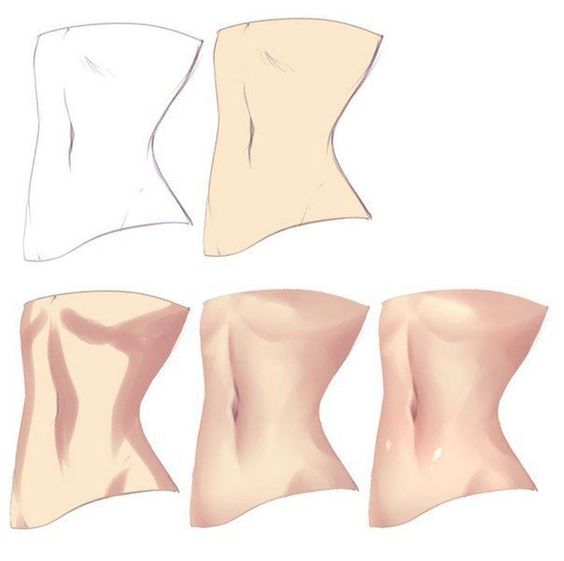
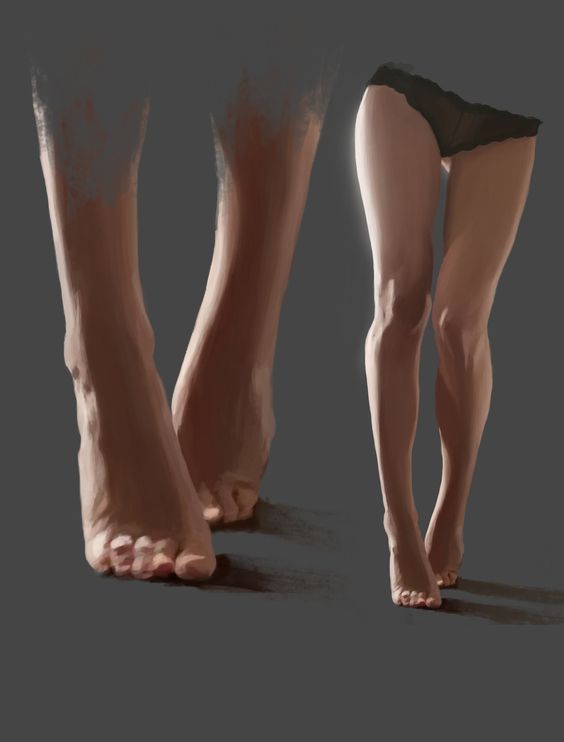
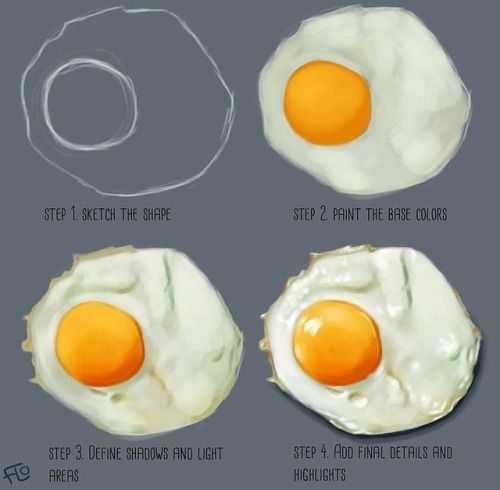
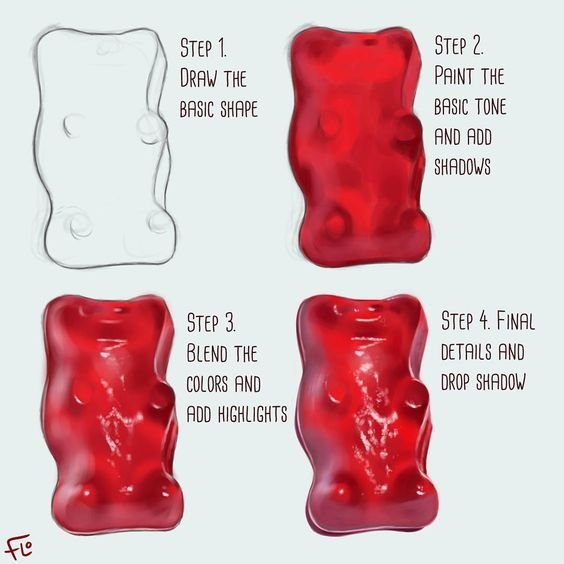
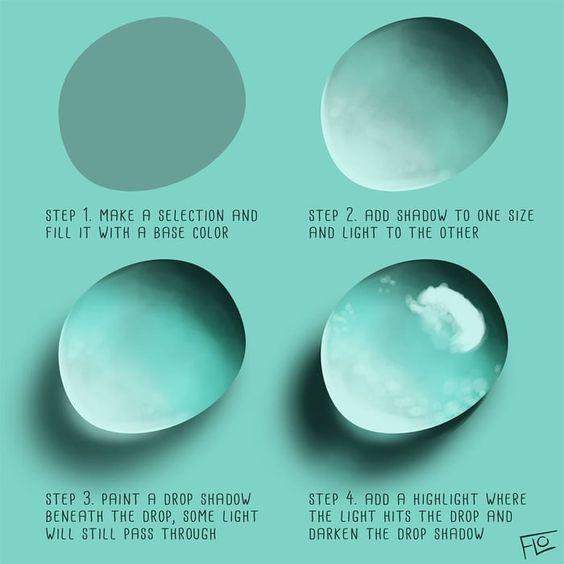
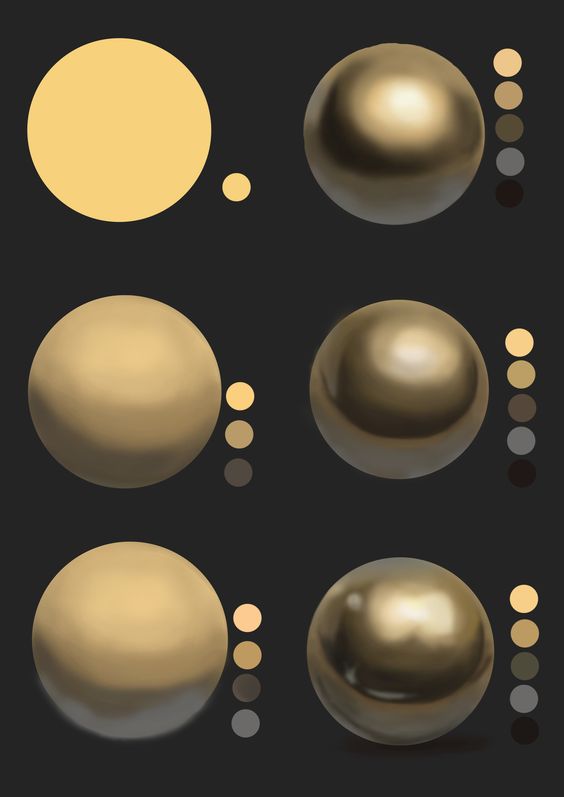
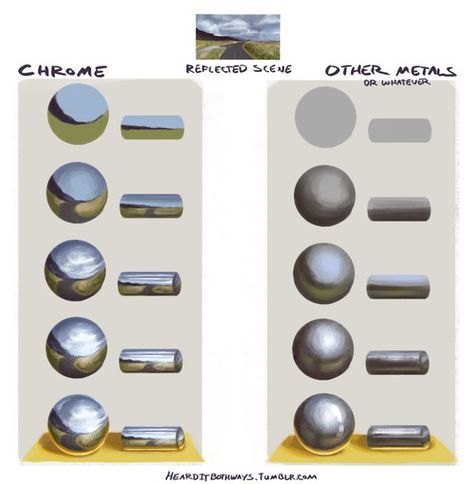
Clothing, food, and small objects are excellent easy digital drawing subjects because they forgive little mistakes. A dress can teach silhouette and folds. A fruit slice can teach flat color and shadow. A shiny object can teach highlight control. You get a complete mini lesson without needing a full character illustration.

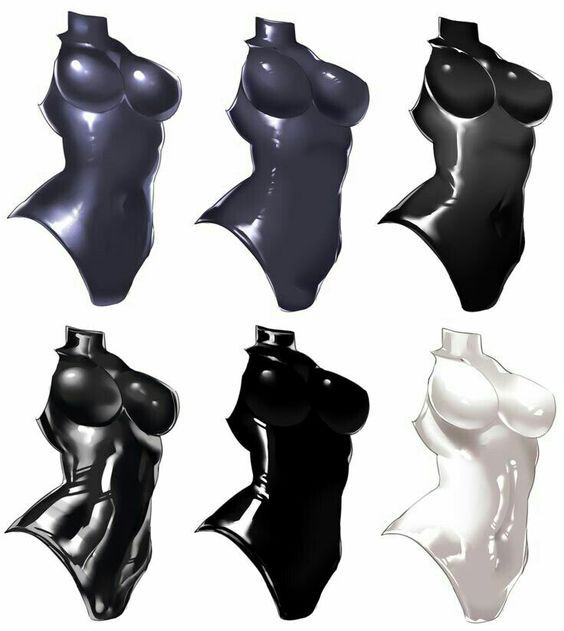
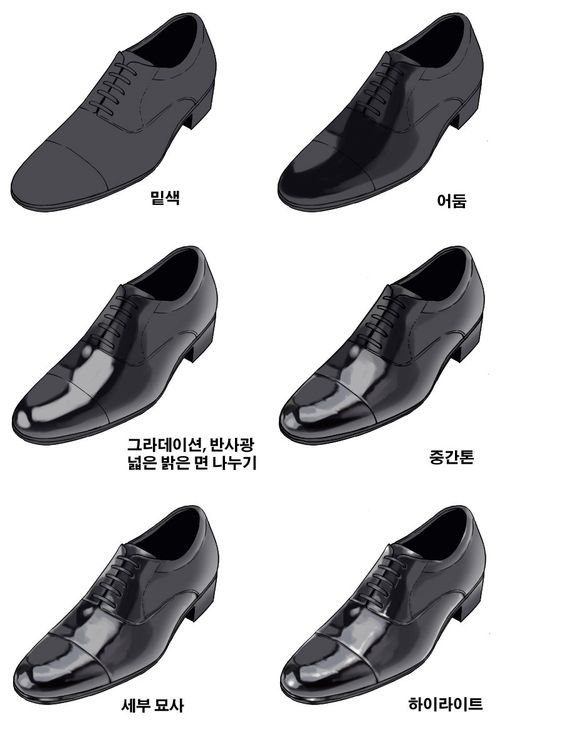
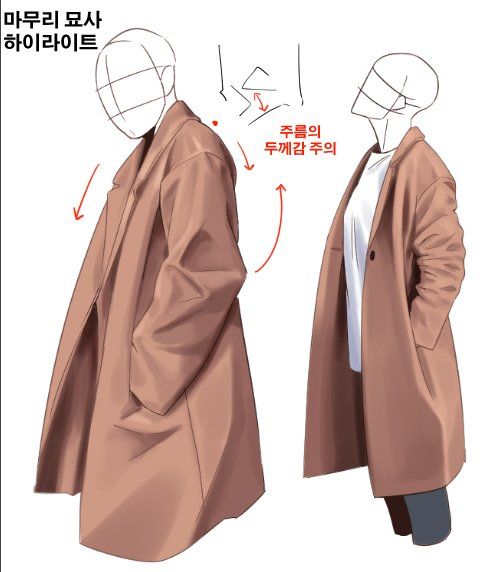
When I sketch clothing digitally, I check the outside shape before folds. If the silhouette is weak, fabric detail only makes it noisier. Draw the biggest shape first, then add just enough lines to show where the fabric bends, pulls, or overlaps.
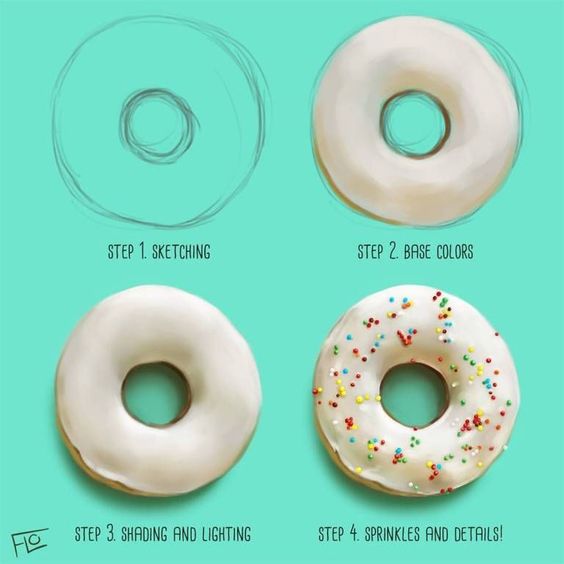


Use gallery style references as quick studies Pick one object finish it in 15 minutes then move on before the colors get overworked
Food studies are good color practice. Use one base color, one darker shadow, and one lighter highlight. The Clip Studio digital art beginner lessons are helpful if you want more structured app-based examples after trying the small studies here.
Digital sketching habits that make beginner art cleaner
- Lower the opacity of your rough sketch before making the clean line layer.
- Use fewer brushes until you understand pressure, opacity, and edge softness.
- Flip the canvas to catch tilted eyes, crooked mouths, and uneven shapes.
- Use clipping masks for shadows so you do not paint outside the base color.
- Merge only when you are sure. Keep the rough version until the end.
If your lines feel stiff, practice with short timed studies. The broader drawing hacks guide can help with sketch control, while the drawing tablets guide is useful if the hardware itself is fighting your hand.
Common beginner digital art mistakes
| Mistake | Why it hurts the drawing | Better move |
|---|---|---|
| Starting too large | The file becomes tiring before the idea is clear. | Finish small studies first. |
| Painting on one layer | Every correction damages something else. | Separate sketch, line, color, shadow, and highlight. |
| Using too many brushes | Texture hides weak shape and value. | Pick one sketch brush and one soft painting brush. |
| Zooming in too much | Details improve while the whole drawing gets worse. | Zoom out after every major pass. |
| Adding texture too early | The image gets busy before the form reads. | Block light and shadow first. |
Hardware helps, but it is not the whole answer. The Apple Pencil support guide and Wacom’s getting started with digital art resource can help with setup, while the drawing still comes down to practice decisions on the canvas.

Related digital drawing guides
Once this beginner workflow feels comfortable, move sideways into more prompts and tools: digital art ideas, digital art ideas and tips, iPad drawing ideas, and how to start drawing in digital format. Each one gives the same skill a slightly different practice angle.
If you share or remix references online, read the Creative Commons license overview before assuming every image is free to reuse. For practice, private studies are fine; for publishing, source choice matters.
Easy digital art FAQ
How do you draw easy digital art as a beginner?
Start with one simple subject, such as an eye, small face feature, food sketch, or clothing fold. Make a rough sketch layer first, lower its opacity, then draw cleaner lines above it. Add flat color before shadows. Keep the first drawing short, because finishing one small study teaches more than abandoning a giant illustration.
What should I draw first in digital art?
Draw small shapes you already understand: eyes, lips, hands, flowers, fruit, shoes, simple objects, or one piece of clothing. These subjects let you practice line control, layers, color fills, and shadows without needing a complex background. Pick one skill per sketch instead of trying to learn everything at once.
What app is best for easy digital drawing?
The best app is the one you can open and use without fighting the interface. Procreate is popular on iPad, Clip Studio Paint is strong for illustration and comics, Krita is a good free desktop option, and Adobe Fresco works well for sketching and painting. For beginners, layers and brush control matter more than having every feature.
Do I need a drawing tablet to start digital art?
A tablet helps, but you do not need the most expensive one. A basic pen tablet, an iPad with Apple Pencil, or another pressure-sensitive setup is enough for beginner practice. The important part is learning pressure, line confidence, layers, and shortcuts. Better hardware feels nice, but it will not replace regular drawing practice.
How many layers should beginner digital art use?
Use a small layer stack at first: rough sketch, clean line, flat color, shadow, highlight, and notes or background. That is usually enough. Too many layers make the file harder to manage, especially when you are learning. Name the important layers so you can fix mistakes without guessing where everything lives.
How do you make digital art look less messy?
Zoom out, simplify the silhouette, and clean one layer at a time. Most messy digital art comes from fixing line, color, shadow, and texture all on the same layer. Lower the sketch opacity, draw cleaner lines above it, use fewer colors, and add shadows only after the main shape reads clearly.
Where can I learn digital art for free?
You can learn a lot from free app handbooks, YouTube tutorials, official software lessons, and simple daily studies. Start with one app, learn layers and brush settings, then practice easy subjects for 15 to 30 minutes. Avoid collecting hundreds of tutorials before you finish a few small drawings yourself.
Final practice note
For your next easy digital art session, choose one image from this page and redraw only the structure. Do not chase a perfect copy. Make the rough shape, clean the line, add flat color, add one shadow, then stop. Repeat the same subject tomorrow and notice what gets cleaner without adding more tools.
- 350.9Kshares
- Facebook0
- Pinterest350.9K
- Twitter3
- Reddit0